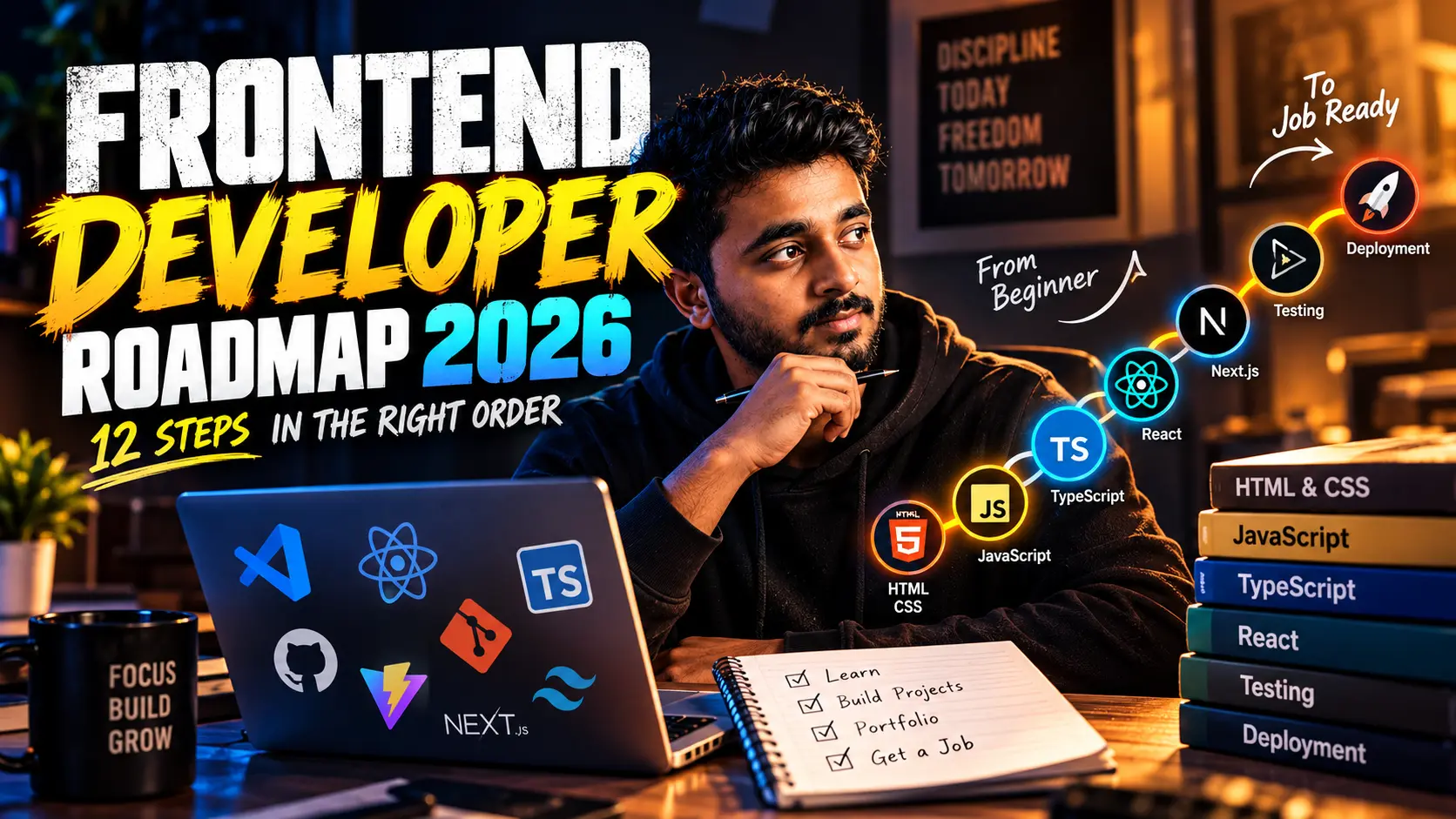
- 1The order matters more than the tools: HTML, CSS and JavaScript come first, then TypeScript and Git, then React, then the professional layer (state, APIs, testing, performance, deployment). Jumping straight to React is the most common reason beginners get stuck.
- 2React is the centre of the modern frontend job market. In the Stack Overflow 2025 survey it was used by roughly 47% of respondents, and TypeScript by about 44%, so learning both together is the safest bet in 2026.
- 3Web quality is a skill, not a bonus. Google's Core Web Vitals give you clear targets: LCP of 2.5 seconds or less, INP of 200 milliseconds or less and CLS of 0.1 or less. Learn to measure them before you call a project finished.
- 4Realistic India fresher pay ranges from about ₹3.5 LPA at IT services companies to around ₹10 LPA at product companies for candidates with strong deployed projects. Sources disagree, so treat every number as directional.
- 5Do not collect certificates. Ship three projects, deploy them, and be able to explain every decision you made. That is what the final step of this roadmap is really about.
Frontend Developer Roadmap 2026: What to Learn, in Exactly This Order
Published: September 30, 2026 · Last updated: September 30, 2026 · 16 min read · By Veeresh Bashetti · Sources linked below
Quick answer, if you're in a hurry: this frontend developer roadmap for 2026 has 12 steps, in this order: HTML, modern CSS, JavaScript, the browser and DOM, TypeScript, Git and GitHub, React, state and data, APIs and authentication, testing, web quality (performance, accessibility, security), then build, deploy and ship three projects. Expect roughly 8 to 11 months at 15 to 20 hours a week. Skipping ahead, especially straight to React, is the most common way beginners waste months. The rest of this guide explains each step, what to skip for now, a realistic timeline, India salary ranges and free video courses.
Table of Contents
- Why the Order of a Frontend Roadmap Matters
- The Frontend Developer Roadmap 2026 at a Glance: 12 Steps
- Phase 1 Foundations Steps 1 to 4
- Phase 2 Professional Habits Steps 5 and 6
- Phase 3 Frameworks and Data Steps 7 to 9
- Phase 4 Quality and Shipping Steps 10 to 12
- Frontend Developer Salary in India and Career Outlook for 2026
- How Long Does It Take to Become a Frontend Developer? A Realistic Timeline
- Common Mistakes That Slow Beginners Down
- Free Resources to Learn Frontend Development
- Copyable Frontend Developer Checklist
- Final Word My Honest Take
- Sources and Further Reading
- More Useful Resources
Why the Order of a Frontend Roadmap Matters
Search for "frontend roadmap" and you will find a wall of logos: React, Vue, Angular, Svelte, Tailwind, Redux, Next.js, Vite. It looks like a menu. It is not. The tools are not equal, and they do not depend on each other equally.
React is a good example. It is the most visible frontend library in job listings, and in the Stack Overflow 2025 survey it was used by roughly 47% of respondents, according to a summary of the survey results. But React is written in JavaScript, renders to the DOM, and is usually styled with CSS. If any of those three is shaky, React does not fix it. It hides the problem until something breaks and you cannot tell why.
That is why an order helps. Each step below makes the next one easier, and each ends with something you can build to prove you learned it.
The 12-step sequence in this guide follows a popular infographic by CodeWithAlpana, which I liked because it is an order rather than a tool list. The explanations, timelines, data and resources here are my own research and writing. I build Django and React applications, and where I give an opinion I say so.
The Frontend Developer Roadmap 2026 at a Glance: 12 Steps
| Step | Topic | What you actually learn | Proof of skill |
|---|---|---|---|
| 1 | HTML | Semantic, accessible page structure | A well-structured multi-page site |
| 2 | Modern CSS | Flexbox, Grid, responsive design, animation | The same site, fully responsive |
| 3 | JavaScript | Scope, closures, async code, the event loop | A small app with no libraries |
| 4 | Browser and DOM | Events, storage, rendering | Interactive UI using the DOM directly |
| 5 | TypeScript | Safe types in real JavaScript projects | Your JS app converted to TS |
| 6 | Git and GitHub | Branches, pull requests, clean commits | A repo with a readable history |
| 7 | React | Components, hooks, forms, transitions | A multi-view React app |
| 8 | State and data | Client state, server state, caching | An app that stays in sync with an API |
| 9 | APIs and auth | REST, error handling, sessions, permissions | Login, protected routes, error states |
| 10 | Testing | Unit, integration and end-to-end tests | A test suite that runs on every push |
| 11 | Web quality | Performance, accessibility, security | Measured scores and an audit write-up |
| 12 | Build and deploy | Bundling, hosting, shipping 3 projects | Three live projects with decision notes |
Phase 1 Foundations Steps 1 to 4
Step 1: HTML, the structure of everything
HTML is not a warm-up you rush through. It is where accessibility starts. Screen readers, search engines and browsers all rely on the meaning of your markup, not how it looks.
Learn the elements that carry meaning: header, nav, main, article, section, footer, headings in a correct hierarchy, lists, tables, forms with proper label elements, and images with useful alt text.
<main>
  <article>
    <h1>Page title</h1>
    <p>Content goes here.</p>
  </article>
</main>
Skip for now: memorising every tag. Learn the common ones and look up the rest.
Step 2: Modern CSS, layout and responsiveness
Modern CSS is far more capable than the CSS most old tutorials teach. The core you need is Flexbox for one-dimensional layouts, Grid for two-dimensional layouts, media queries and fluid sizing for responsive design, custom properties (CSS variables) for consistent theming, and transitions for simple animation.
Skip for now: CSS frameworks. Tailwind and similar tools are valuable, but they make far more sense once you know what the underlying CSS is doing. Build at least one full layout in plain CSS first.
Step 3: JavaScript, where most beginners struggle
This is the step that decides how the rest goes. According to the Stack Overflow 2025 results reported by FOSSPost, JavaScript was again the most used language, at about 66% of respondents. It is also the language where shallow understanding is most expensive later.
Focus on the ideas the roadmap names, because they show up in every framework:
- Scope: where a variable can be seen, and the difference between
let,constand the oldervar. - Closures: a function remembering the variables around it.
- Async code: promises,
asyncandawait, and handling errors when something takes time. - The event loop: why a slow task freezes the page, and how the browser schedules work.
function makeCounter() {
  let count = 0;
  return () => ++count;
}
const next = makeCounter();
next(); // 1
next(); // 2
That small example is a closure. If you can explain why count survives after makeCounter finishes, you are on the right track.
Step 4: The browser and the DOM
The DOM is the live tree the browser builds from your HTML. Frameworks like React are, underneath, clever ways of updating it. Learn to select elements, listen for events, and change the page directly. Then learn the browser features you will use constantly: localStorage, sessionStorage and cookies for storing data, and the basic idea of how a browser turns HTML, CSS and JavaScript into pixels on screen.
Build: a to-do app, a quiz or a small dashboard using only HTML, CSS and JavaScript. No libraries. Finishing it without React is what proves you understand what React later does for you.
Phase 2 Professional Habits Steps 5 and 6
Step 5: TypeScript, types for real projects
TypeScript adds types on top of JavaScript so many mistakes are caught before the code runs. It is now mainstream. The same Stack Overflow 2025 data shows about 44% of respondents using it, and GitHub's Octoverse 2025 reported TypeScript overtaking Python and JavaScript in August 2025 to become the most used language on GitHub by monthly contributors, as summarised here.
The order matters: learn JavaScript first, because TypeScript is a layer on top of it. Then learn basic types, interfaces, unions, generics at a simple level, and how to type function arguments and return values.
type User = { id: number; name: string };
const greet = (user: User) => `Hello, ${user.name}`;
A good bridge into the next steps is a free freeCodeCamp video on using TypeScript with React, published in July 2026:
Step 6: Git and GitHub, how developers work together
Git tracks your changes. GitHub hosts them and lets teams review each other's work. Learn branches, commits with clear messages, pull requests and how to resolve a merge conflict.
Start using Git from your very first project, not after Step 6. The step is listed here because a professional workflow is a separate skill from the basic commands. Your GitHub profile is also the first thing many recruiters check, so a readable history and good README files are part of your portfolio.
Phase 3 Frameworks and Data Steps 7 to 9
Step 7: React, components, hooks and forms
React lets you build a UI from small reusable components. Learn components and props, useState and useEffect, controlled forms, lists and keys, conditional rendering and transitions. Then learn what changed in React 19, which added form actions and hooks such as useActionState and useOptimistic for handling data changes more cleanly.
Bob Ziroll's free course from Scrimba on the freeCodeCamp channel walks through these changes. It was published in June 2024, so it is a refresher on React 19 rather than a beginner's first React lesson.

If you are brand new to React, pair it with a beginner course first and use this one once components and hooks feel familiar.
Skip for now: Next.js, Remix and other meta-frameworks. Learn plain React with Vite first.
Step 8: State and data, client state versus server state
Most beginner React bugs come from mixing two different kinds of state.
- Client state belongs to the interface: whether a menu is open, which tab is selected, what is typed in a form. React's own state, context, or a small library like Zustand handles this.
- Server state is data that lives on a server and gets copied into your UI: a list of products, a user profile. It can go stale, needs loading and error handling, and benefits from caching. Tools such as TanStack Query exist for exactly this.
Once you can explain that difference, you will stop putting everything into one global store, which is a very common beginner mistake.
Step 9: APIs and authentication
Most real frontends talk to an API. Learn REST basics (methods, status codes, headers), how to handle loading, success and error states properly, and how sessions and permissions work.
For authentication, understand the difference between authenticating (who are you) and authorising (what are you allowed to do). Learn why tokens should be handled carefully: many security guides recommend httpOnly cookies over storing tokens in localStorage, because scripts injected through an XSS flaw can read localStorage. Read up on CORS too, since you will meet it the first time your frontend and API live on different domains.
If you also want to understand the backend side of these calls, my guide to every HTTP status code explained with real examples is a good companion.
Phase 4 Quality and Shipping Steps 10 to 12
Step 10: Testing, unit, integration and end-to-end
Testing is what separates a project from a product. There are three levels:
- Unit tests check one small function or component in isolation.
- Integration tests check that several pieces work together, for example a form that submits and shows a result.
- End-to-end tests drive a real browser through a full user journey.
Common tools in the React ecosystem include Vitest for unit tests, React Testing Library for component and integration tests, and Playwright for end-to-end tests. You do not need 100% coverage. Aim to test the paths that would hurt users most if they broke: login, checkout, saving data.
Step 11: Web quality, performance, accessibility and security
This is the step most roadmaps mention in one line and most beginners skip. It is also the one that makes your work look professional.
Performance. Google's Core Web Vitals turn "feels slow" into three measurable targets, assessed at the 75th percentile of real users, per web.dev:
- LCP (Largest Contentful Paint) should occur within 2.5 seconds.
- INP (Interaction to Next Paint) should be 200 milliseconds or less.
- CLS (Cumulative Layout Shift) should be 0.1 or less.
INP replaced the older FID metric in March 2024, so any tutorial still talking about FID is out of date. Learn to reserve space for images so the layout does not jump, avoid shipping huge JavaScript bundles, and measure with Lighthouse and PageSpeed Insights.
For React-specific speed problems, the free freeCodeCamp course below (January 2026) explains why components re-render and which optimisations are actually worth doing:
Accessibility. Follow the WCAG 2.2 guidelines. In practice that means keyboard navigation for everything, visible focus states, sufficient colour contrast, meaningful labels and alt text, and semantic HTML from Step 1. Try your own project using only a keyboard, then with a screen reader.
Security. Learn what cross-site scripting (XSS) is, why you must never inject untrusted content as raw HTML, and what a Content Security Policy does. Also keep dependencies updated.
Step 12: Build, deploy and ship three projects
The last step is the one that turns learning into evidence. Learn how a bundler such as Vite prepares your app for production, then deploy to a host like Vercel, Netlify, Cloudflare Pages or GitHub Pages (all have free tiers at the time of writing, but check current limits).
Then ship three projects and, as the roadmap puts it, explain your decisions. Here is a set I would recommend:
- A responsive, accessible multi-page site using only HTML, CSS and JavaScript (Steps 1 to 4).
- A React and TypeScript app that uses a real public API, with loading and error states, server-state caching and a few tests (Steps 5 to 10).
- A full app with login and protected pages, deployed, with measured Core Web Vitals and an accessibility check written up in the README (Steps 9 to 12).
For each one, add a short "decisions" section to the README: why you chose the tools you did, what you would change, and one bug you found and how you fixed it. Being able to explain a decision clearly is what interviewers are actually testing.
Frontend Developer Salary in India and Career Outlook for 2026
Is frontend development still a good career in 2026? Yes, with honest caveats.
Salary. Published figures for India vary a lot, so treat them as directional. One 2026 salary guide puts fresher pay at ₹3.5 to 6 LPA at IT services companies and ₹5 to 10 LPA at product companies and global capability centres (Recrew). Another puts freshers at ₹4 to 7.5 LPA, higher at product companies with strong projects (Eventbeep). The pattern across sources is consistent: company type and proof of skill matter more than the job title.
AI. AI tools now generate a lot of routine interface code, which raises the bar for juniors. What they do not replace is judgement: knowing why a layout breaks on a small screen, why a page is slow, or why a form is unusable with a keyboard. Those are the skills in Steps 9 to 12. I wrote more about how this affects junior roles in Is GenAI Developer a Real Career or LinkedIn Hype and about hiring trends in Are AI Jobs in Demand in 2026.
The honest summary: the entry point is more competitive than a few years ago, but a candidate with fundamentals, TypeScript, React, tests and three deployed projects still stands out.
How Long Does It Take to Become a Frontend Developer? A Realistic Timeline
This is my own estimate, not a published statistic. It assumes about 15 to 20 focused hours a week and no prior programming experience. Faster if you study full-time or already code.
| Steps | Topic | Approx. time |
|---|---|---|
| 1 to 2 | HTML and CSS | 4 to 6 weeks |
| 3 to 4 | JavaScript, browser and DOM | 8 to 10 weeks |
| 5 to 6 | TypeScript and Git | 3 to 4 weeks |
| 7 to 9 | React, state and data, APIs and auth | 12 to 16 weeks |
| 10 to 11 | Testing and web quality | 4 to 5 weeks |
| 12 | Build, deploy, three projects | 4 to 6 weeks |
That adds up to roughly 8 to 11 months. Some steps overlap. You should be using Git from day one, and you will keep improving CSS and JavaScript the whole way through.
Common Mistakes That Slow Beginners Down
- Starting with React. If you cannot build a small interactive page without a framework, React will feel like magic and then like a maze.
- Tutorial hopping. Watching five courses on the same topic feels productive. Building one project from a blank file is what actually teaches.
- Copy-pasting AI output you do not understand. Use AI to explain and to review, and then rewrite the code in your own words.
- Ignoring accessibility until the end. It is far cheaper to use semantic HTML from Step 1 than to retrofit it later.
- Never deploying. A project that only runs on your laptop is much weaker evidence than a live link.
- Learning tools instead of concepts. Libraries change every year. Closures, the event loop, HTTP and the browser rendering model do not.
Free Resources to Learn Frontend Development
You do not need to pay to learn this roadmap.
- freeCodeCamp: free structured curriculum plus long YouTube courses. Its Responsive Web Design certification covers semantic HTML, forms, accessibility, Flexbox and Grid.
- MDN Web Docs: the most reliable reference for HTML, CSS, JavaScript and browser APIs. Use it whenever a tutorial and reality disagree.
- react.dev: the official React documentation, with interactive examples.
- web.dev: Google's guides on performance, accessibility and Core Web Vitals.
- The Odin Project and Full Stack Open: project-driven, free courses that go deeper than most videos.
A quick note on videos: check the publication date before you commit. React and its ecosystem change quickly, and a five-hour course from 2018 will teach patterns like class components that are rare in new code today.
Copyable Frontend Developer Checklist
Copy this into a notes app or print it.
Foundations
- Built a multi-page site with semantic HTML
- Made it responsive with Flexbox and Grid, no framework
- Can explain scope, closures and the event loop in my own words
- Built a small app with vanilla JavaScript and the DOM
Professional habits
- Converted a JavaScript project to TypeScript
- Use Git branches, pull requests and clear commit messages
Frameworks and data
- Built a React app with hooks and forms
- Can explain client state versus server state
- Built login and protected routes, with proper error handling
Quality and shipping
- Wrote unit, integration and at least one end-to-end test
- Measured LCP, INP and CLS and fixed at least one issue
- Tested with keyboard only and checked colour contrast
- Deployed three projects with README decision notes
Final Word My Honest Take
A roadmap is not a guarantee, and nobody can promise you a job or a salary from a list of topics. What a good roadmap gives you is a sequence that stops you from wasting months on the wrong thing.
If you remember one thing from this guide, make it this: fundamentals first, framework second, quality third, proof last. The learners who struggle are usually the ones who did it in reverse: framework first, fundamentals never, and no live projects to show.
Pick Step 1 today. Build something small, put it on GitHub, and move to the next step only when you can explain what you built.
Sources and Further Reading
The data referenced in this article draws on the following sources, checked in September 2026:
- web.dev: Web Vitals: official Core Web Vitals thresholds (LCP, INP, CLS)
- W3C: Web Content Accessibility Guidelines (WCAG) 2.2: accessibility standard
- FOSSPost: Most Used Programming Languages 2026: summary of Stack Overflow 2025 survey and GitHub language data
- Enstacked: Stack Overflow Developer Survey 2025 insights: React and Node.js usage figures
- Recrew: Frontend Engineer Salary in India 2026: fresher salary ranges by company type
- Eventbeep: Frontend Developer Salary in India 2026: fresher salary ranges by city
- freeCodeCamp: Level Up Your React Skills with TypeScript: video course details
- freeCodeCamp: What's New in React 19: video course details
- freeCodeCamp: How to Optimize React: video course details
Salary figures are directional ranges from published guides, not guarantees, and they differ between sources. Always cross-check current numbers before making a career decision. Survey percentages reflect self-reported usage and change every year.
This article is maintained and updated as tools and hiring data change. If you spot outdated information, please use the Contact page to flag it.
About the Author
Veeresh Bashetti is a full-stack developer who builds Django and React applications and writes practical, project-tested guides for developers and students, with a focus on separating genuine industry trends from marketing hype. Read more on the About page.
More Useful Resources
- 5 Django Mistakes I Made as a Beginner (and How to Avoid Them)
- 15 Chrome Extensions Every Developer Should Have Installed in 2026
- 9 AI Tools That Are Actually 100% Free for Developers in 2026
- Every HTTP Status Code Explained with Real Examples (2026 Guide)
- More Career and Tech Articles
Did you find this helpful?
FAQ