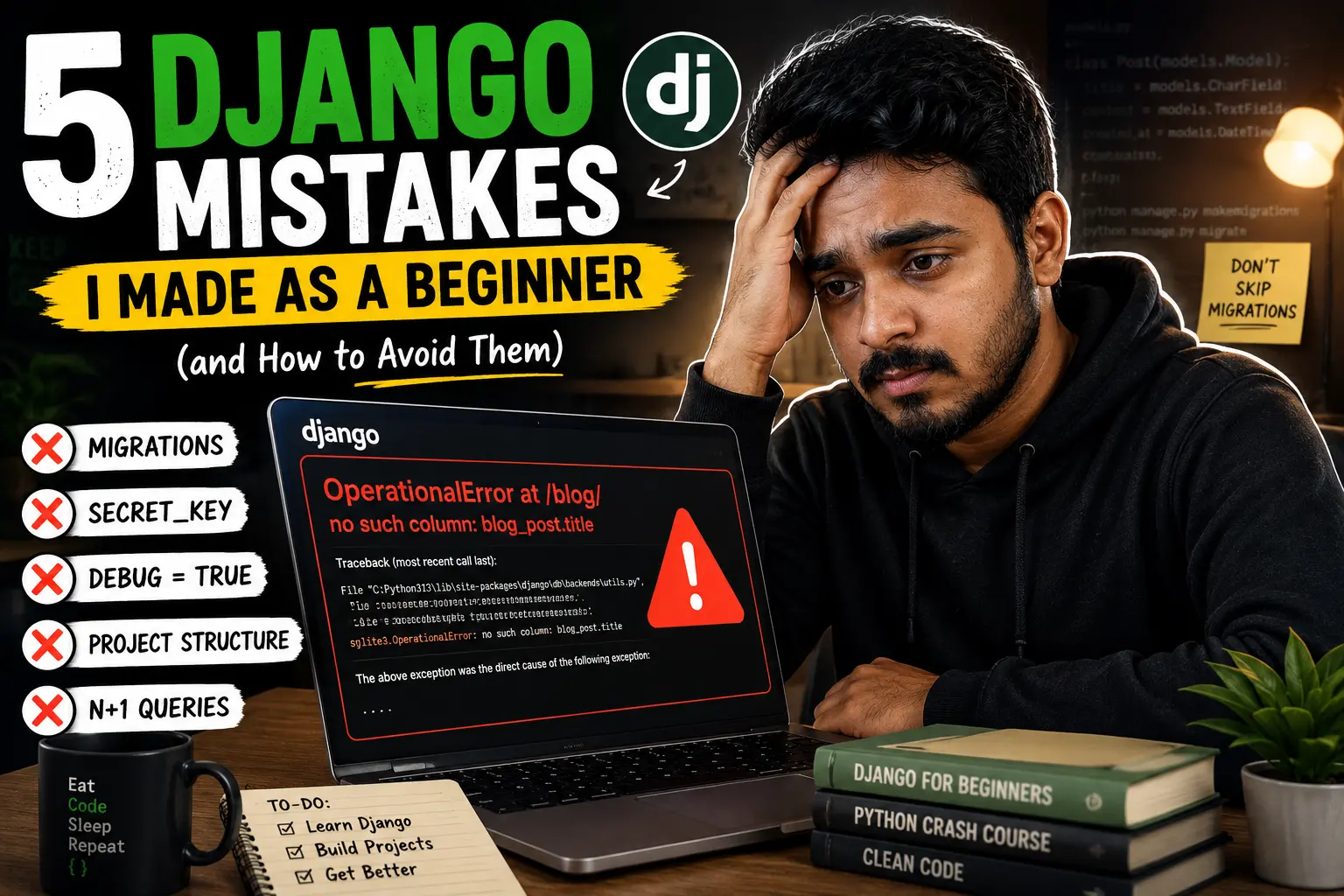
- 1Almost every 'weird' Django error a beginner hits — 'no such column', a leaked SECRET_KEY, a slow admin page — traces back to one of five well-known mistakes, not a mysterious bug in Django itself.
- 2Migrations are not optional bookkeeping — they are how Django keeps your Python models and your actual database table in sync. Skip one, and the database quietly falls out of sync with your code.
- 3Never commit SECRET_KEY, database passwords, or API keys directly inside settings.py. Once a secret is pushed to GitHub, treat it as compromised — rotating it is the only real fix, deleting the commit is not enough.
- 4DEBUG = True is meant for your laptop, not the internet. Leaving it on in production hands out your file paths, installed apps, and sometimes environment variables to anyone who triggers an error page.
- 5A messy 2,000-line views.py isn't a personal failing — it's what happens when nobody taught you Django's app-based structure early. Splitting logic into small, focused apps fixes 80% of 'my project feels unmanageable' problems.
- 6The N+1 query problem is invisible until your app has real data — it's the single most common reason a Django site that felt 'fast enough' in development turns painfully slow in production.
5 Django Mistakes I Made as a Beginner (and How to Avoid Them)
Django doesn't actually punish beginners. It just has strong opinions about how things should be done — and it tells you exactly when you've ignored one of them, usually in red text, usually at 11 PM.
Published: July 26, 2026 · 12 min read · By Veeresh Bashetti
Before You Start: This Is Written for Real Beginners
If you've just installed Django and you're still Googling "what is a migration in django" — good, stay right here. I'm not going to assume you already know Django's vocabulary. Every term gets explained the first time it shows up, in plain English, with a small code example. If you're more experienced and just want the fixes, feel free to skip straight to any section using the list on the side.
Why I'm Writing This the Honest Way
Most "Django mistakes" posts read like a checklist written by someone who never actually made the mistakes. This one is different — every single item below is something I genuinely broke, followed by exactly how I found out, and exactly what fixed it. If a post like this had existed when I started, it would have saved me a very frustrating week.
These five mistakes aren't rare or unusual either. They show up again and again across beginner forums, coding bootcamp write-ups, and developer blogs — which tells you something important: this isn't about you being careless. It's about Django having a few habits that nobody explains clearly enough, early enough.
Mistake #1: Forgetting to Run Migrations After Changing a Model
What Actually Happened
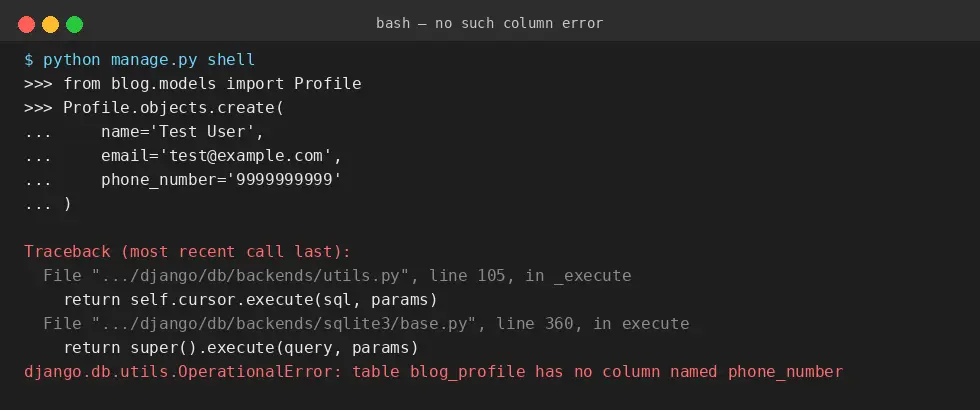
I added a new field to one of my models — something simple, like adding a phone_number field to a Profile model. I saved the file, refreshed my browser, and Django threw this at me:
django.db.utils.OperationalError: no such column: app_profile.phone_number
I stared at that error for way longer than I'd like to admit, because in my head, I had added the column. I could see it right there in models.py.
Why This Happens
Here's the part nobody explains clearly enough when you're starting out: your models.py file and your actual database are two separate things that don't automatically stay in sync. Django's models are just Python classes. Your database — SQLite, PostgreSQL, whatever you're using — is a completely separate piece of software with its own tables and columns.
A migration is Django's way of translating "here's what changed in my Python models" into "here's the exact SQL needed to update the real database." Until you generate and apply that translation, your code and your database quietly disagree with each other — and Django has no way of knowing you meant to add that column.
The Fix
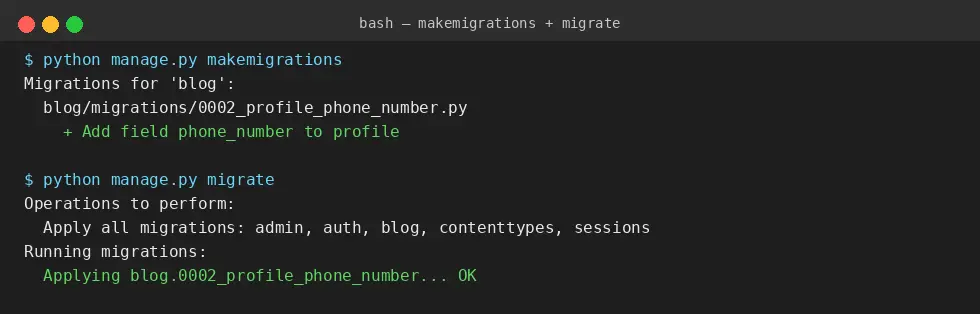
Every single time you add, remove, or change a field in models.py, run these two commands in order:
python manage.py makemigrations
python manage.py migrate
Think of it as a two-step handshake:
makemigrationswrites down what changed, as a migration file (like a change-log entry)migrateactually applies that change-log entry to your real database
Beginner tip: if you ever see a no such column or no such table error right after editing a model, this is almost always the reason. Check your migrations before you check anything else.
Mistake #2: Skipping Virtual Environments Completely
What Actually Happened
My very first Django project worked perfectly. My second project, a few weeks later, installed a newer version of a package that quietly broke my first project when I went back to it — because I had installed everything globally on my system, with no separation between projects.
Why This Happens
When you're new, pip install django feels simple enough that creating a "virtual environment" first feels like an unnecessary extra step. But here's the actual problem it solves: every Django project you build will eventually need its own specific versions of Django and other packages. Project A might need Django 4.2. Project B might need Django 5.2. If everything is installed globally on your one system, the second install can silently overwrite or conflict with the first.
A virtual environment is simply an isolated, self-contained folder with its own copy of Python packages — so each project gets its own clean, independent setup.
The Fix
Before installing anything for a new Django project, create and activate a virtual environment:
python -m venv venv
source venv/bin/activate   # on Mac/Linux
venv\Scripts\activate      # on Windows
Then install Django inside that activated environment:
pip install django
Beginner tip: if your terminal prompt shows (venv) at the start of the line, your virtual environment is active. If you ever get confusing "it worked before, why is it broken now" errors across different projects, this is usually why.
Mistake #3: Hardcoding SECRET_KEY (and Other Secrets) Directly in settings.py
What Actually Happened
I pushed one of my early Django projects to GitHub to show a friend, completely forgetting that settings.py still had my real SECRET_KEY sitting in plain text, exactly as Django generates it by default:
SECRET_KEY = 'django-insecure-a8x92kf...'
It sat there, publicly visible, for about two days before I noticed.
Why This Happens
When Django creates a new project, it auto-generates a SECRET_KEY directly inside settings.py, because that's the fastest way to get you started. Nobody tells you, in that moment, that this key is meant to stay private — it's used for security-critical things like signing session cookies and password reset tokens. If it leaks, someone could potentially forge session data or tamper with signed information in your app.
The Fix
Move secrets out of your code entirely, into environment variables. A simple, beginner-friendly way is using the python-decouple package:
pip install python-decouple
# settings.py
from decouple import config

SECRET_KEY = config('SECRET_KEY')
Then store the actual value in a separate .env file that you never commit to GitHub:
SECRET_KEY=your-real-secret-key-goes-here
Add .env to your .gitignore file immediately, before you write a single secret into it.
Beginner tip: if you've already pushed a real secret to GitHub, changing it back and deleting the commit is not enough — treat that key as compromised and generate a brand-new one, because the old value may already be cached or scraped.
Mistake #4: Leaving DEBUG = True When Deploying
What Actually Happened
I deployed my first real Django project to a live server, feeling proud of myself, without changing a single setting from my local development environment. A visitor hit a small bug on the site — and instead of a simple error message, they saw a full, detailed Django debug page: my file paths, my installed apps, and pieces of my code.
Why This Happens
DEBUG = True is genuinely useful while you're building — it gives you detailed, readable error pages instead of a generic "something went wrong" screen. But that same detailed page becomes a security risk the moment real users can reach your site, because it can reveal internal file structure and configuration details that should stay private.
The Fix
Before deploying anywhere, in your production settings:
DEBUG = False
ALLOWED_HOSTS = ['yourdomain.com']
If you're switching between local development and production, keep them as separate settings controlled by an environment variable, so you never have to remember to manually flip this by hand:
DEBUG = config('DEBUG', default=False, cast=bool)
Beginner tip: if DEBUG = False and something breaks, you'll now see a plain error page instead of a detailed one — that's expected and correct. Check your server logs to actually debug the issue instead.
Django actually ships a built-in command that catches both Mistake #3 and Mistake #4 before you ever deploy — python manage.py check --deploy. Here's the real output it gives on a fresh project that still has the default SECRET_KEY and DEBUG = True:
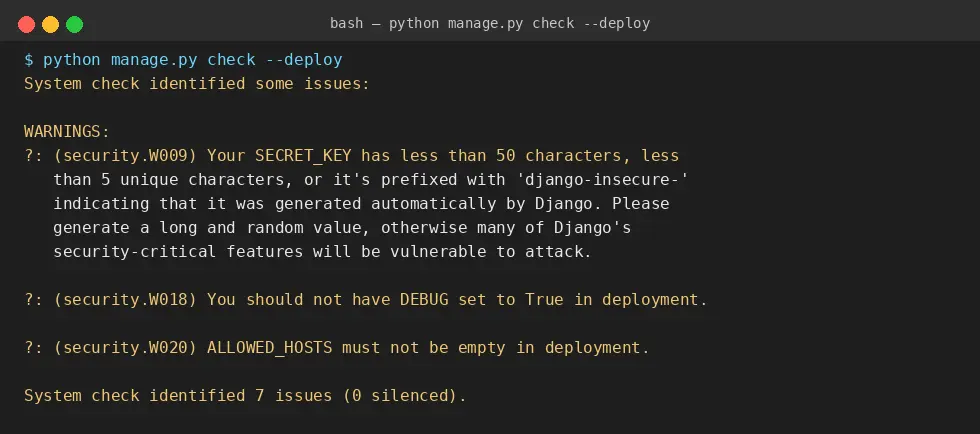
Beginner tip: run python manage.py check --deploy before every deployment, even on a small personal project. It's a genuinely free safety net Django gives you for free — most beginners just don't know it exists.
Mistake #5: Cramming Everything Into One Giant App
What Actually Happened
My first "real" Django project had a single app called main. Every model, every view, every form for the entire website lived inside it. By month two, views.py had grown past 1,500 lines, and I genuinely dreaded opening it.
Why This Happens
Django is designed around the idea of small, focused apps — each one handling one clear piece of functionality, like blog, accounts, or payments. But when you're new, creating "one more app" feels like unnecessary overhead, so it's tempting to just keep adding to whatever app already exists. That decision feels harmless on day one and becomes genuinely painful by month three, when you can't find anything anymore.
The Fix
Split logic by responsibility, not by convenience. A simple content website might look like this:
myproject/
├── blog/          → handles posts, comments
├── accounts/      → handles login, signup, profiles
├── payments/      → handles subscriptions, billing
Create a new app with:
python manage.py startapp blog
Beginner tip: a good rule of thumb — if you're scrolling for more than a few seconds to find a specific view or model, your app has probably grown past the point where it should have been split.
Bonus Mistake: The N+1 Query Problem (The One That Sneaks Up Later)
This one didn't bite me in my first month — it bit me a few months in, once I had real data in the database, which is exactly why it deserves a mention here.
What Actually Happened
I had a page listing blog posts, and each post displayed its author's name. It worked fine with 10 test posts. With 2,000 real posts, the same page took several seconds to load.
Why This Happens
My template was doing something like this:
posts = Post.objects.all()
{% for post in posts %}
  {{ post.author.name }}
{% endfor %}
That single line inside the loop — post.author.name — triggers a separate database query for every single post, just to fetch its author. One query to get the list of posts, then one more query per post. For 2,000 posts, that's 2,001 queries for a single page load. This is exactly what developers call the N+1 query problem.
The Fix
Tell Django to fetch the related author data upfront, in the same query, using select_related:
posts = Post.objects.select_related('author').all()
Now Django fetches posts and their authors together, in one efficient query, instead of one query per post.
Beginner tip: any time you're accessing a related model (post.author, order.customer) inside a loop, that's your signal to check whether select_related or prefetch_related could combine those queries into one.
Watch: Seeing These Mistakes in a Real Django Project
If reading code examples isn't quite enough and you'd rather watch someone build an actual Django project from scratch — including the model, migration, and app structure decisions discussed above — this beginner-friendly walkthrough is a solid place to see it all in context.

Putting It All Together: A Simple Beginner Checklist
Before you call any Django project "done" — even a small practice one — run through this:
- Did you run
makemigrationsandmigrateafter your last model change? - Is your project running inside an activated virtual environment?
- Is your real
SECRET_KEYsitting only in an untracked.envfile, never insettings.pydirectly? - Is
DEBUGset toFalseanywhere the project is actually reachable by other people? - Does each Django app in your project handle one clear responsibility, instead of everything living in one giant app?
- If you're looping through a queryset and accessing a related model inside that loop, have you checked whether
select_relatedorprefetch_relatedwould help?
If you can answer yes to all six, you're already ahead of where most people are after their first few months with Django.
Final Thoughts
None of these five mistakes mean you're bad at this. They mean you're learning Django the way almost everyone does — by hitting a wall, feeling briefly confused, and then understanding why the wall was there in the first place. That last part is the actual skill. Anyone can copy a fix from Stack Overflow; understanding why the mistake happened is what makes sure you don't repeat it in your next project, or the one after that.
If you're just starting out, bookmark this post. Come back to it the next time Django throws a red error message at you — there's a decent chance the answer is already sitting in one of the sections above.
Keep Reading
- Build your first Django project structure the right way, from scratch, using the app-based approach described in Mistake #5
- Learn how Django's ORM and
select_related/prefetch_relatedactually work under the hood - A simple guide to environment variables and
.envfiles for Python beginners
This article is based on real, first-hand mistakes made while learning Django, cross-checked against common patterns reported across multiple Django developer communities and tutorials as of 2026. Django version details referenced (such as the 5.2 LTS release) reflect publicly available information at the time of writing — always check the official Django documentation at djangoproject.com for the most current release details.
Did you find this helpful?
FAQ