
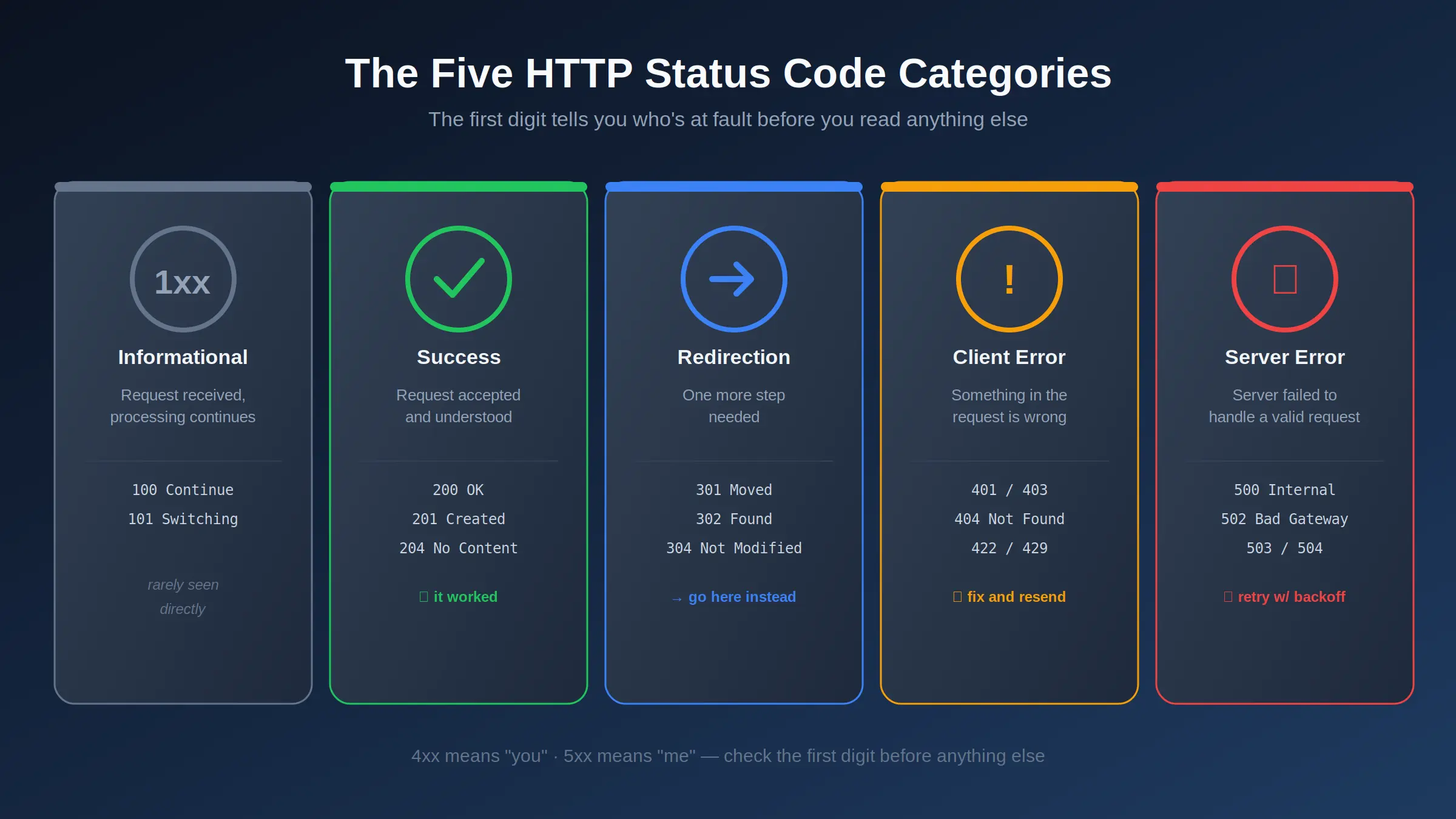
- 1Only the first digit really tells you who's at fault: 4xx means the client got something wrong, 5xx means the server did — that one rule solves most debugging confusion instantly.
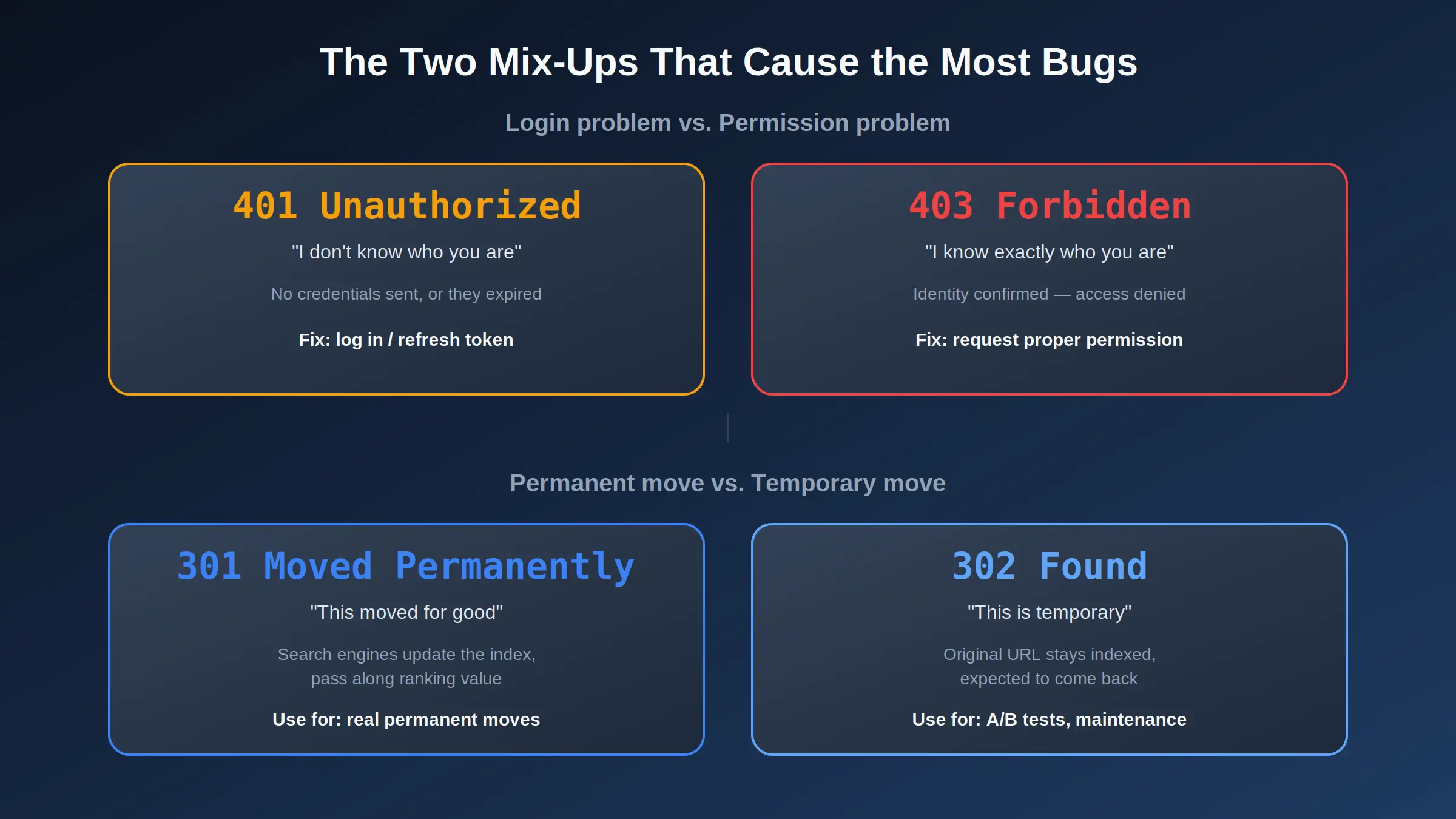
- 2401 means 'we don't know who you are,' 403 means 'we know exactly who you are, and the answer is no.' Mixing these up is one of the most common API mistakes.
- 3Returning 200 OK with an error message in the response body breaks HTTP semantics — it stops CDNs, monitoring tools, and libraries like Axios or fetch from ever catching the failure.
- 4301 tells Google 'this moved forever, update your index.' 302 tells it 'this is temporary, keep the old URL indexed.' Using the wrong one can quietly cost you rankings.
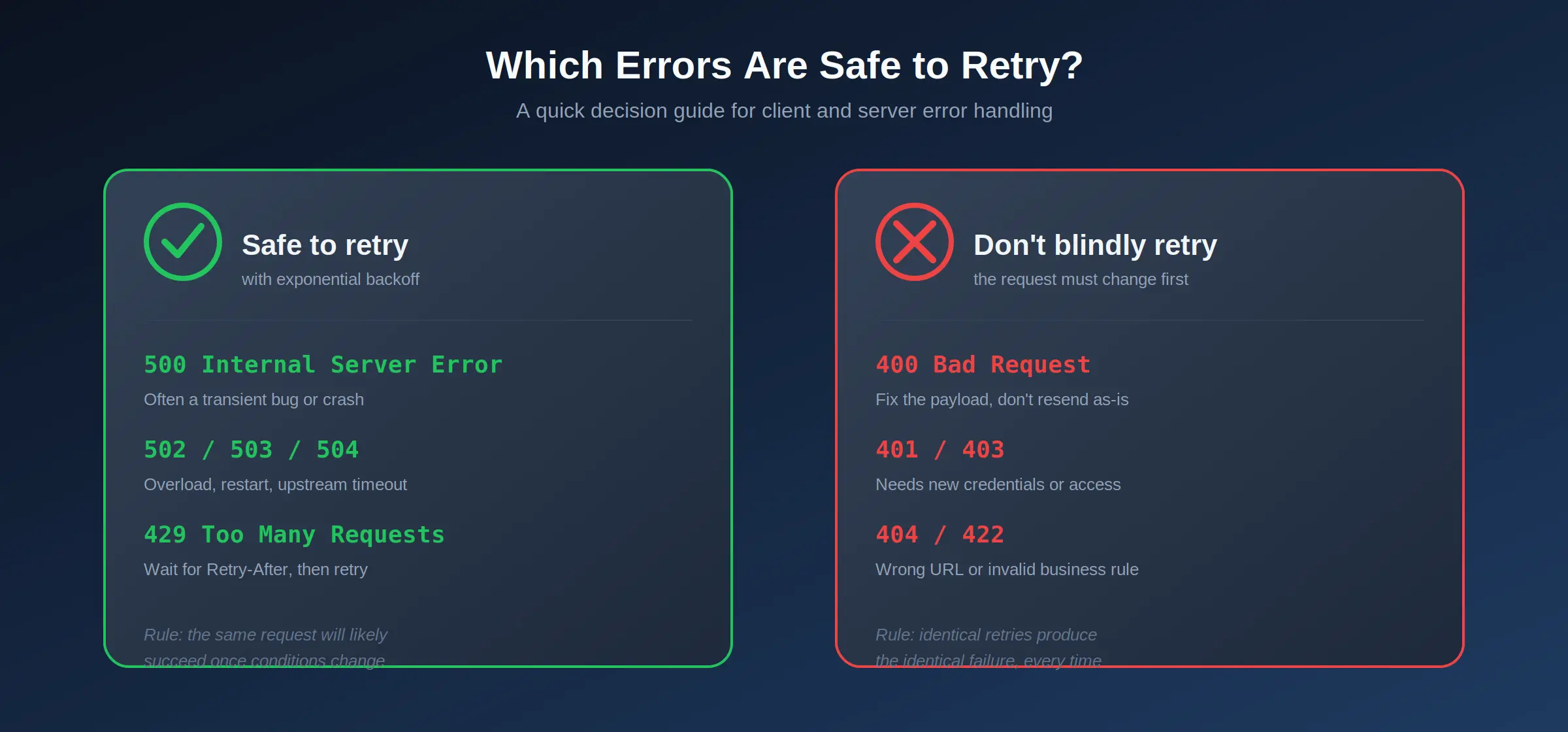
- 55xx errors are usually worth retrying with backoff. 4xx errors almost never are — the request itself needs to change first.
- 6429 Too Many Requests should always be paired with a Retry-After header, so the client knows exactly when to try again instead of guessing.
Every HTTP Status Code Explained with Real Examples (2026 Guide)
Published: July 28, 2026 · 19 min read · By Veeresh Bashetti
Why This Isn't Just Another Copy-Pasted List
Most "HTTP status code" articles are the same table copy-pasted from documentation with zero context. I've spent the last few years shipping Django and DRF-based systems — inventory platforms, invoicing modules, e-commerce backends — and the truth is, you only really understand a status code the first time it breaks something in production. A 403 that should've been a 401. A 302 that quietly tanked a redirect's SEO value. A "successful" 200 response that was actually hiding an error.
This is the guide I wish I'd had when I was still guessing between 400 and 422. If you also read my breakdown of the new HTTP QUERY method, think of this as the companion piece — that one covered a brand-new method; this one covers the responses your server sends back no matter which method was used.
📥 Grab the cheat sheet: if you just want the reference table pinned to your desk, skip to the downloadable cheat sheet — one page, every code, color-coded by category.
How a Status Code Is Actually Structured
Every HTTP response carries a three-digit status code, and the very first digit tells you the category of what happened before you even read the rest:
- 1xx — Informational: the request was received, and processing is still ongoing.
- 2xx — Success: the request was received, understood, and accepted.
- 3xx — Redirection: the client needs to take one more step to complete the request.
- 4xx — Client Error: something about the request itself was wrong.
- 5xx — Server Error: the request was fine, but the server failed to handle it.
That single rule — 4xx means "you," 5xx means "me" — is the fastest debugging shortcut in web development. If you're staring at a failing request, check the first digit before anything else.
Watch It Explained
1xx — Informational Responses (The Ones You Never See)
These are interim responses. Browsers don't usually surface them directly because they're not the final answer to a request — they're the server saying "keep going" mid-conversation.
- 100 Continue — Sent when a client includes an
Expect: 100-continueheader before uploading a large body (think a big file upload). It lets the server reject the request early — say, if auth fails — before the client wastes bandwidth sending the whole payload. - 101 Switching Protocols — Confirms the server is switching to the protocol the client asked for, most commonly seen during a WebSocket handshake.
- 102 Processing (WebDAV) — The server has accepted the request but needs more time, and doesn't want the client to time out while it works.
Unless you're building low-level networking tools or WebSocket servers, you'll rarely touch these directly — but knowing they exist explains some of the weirder entries you'll see in raw network logs.
2xx — Success (It Worked)
This is the category everyone wants to see, but there's more nuance here than just "200 good."
- 200 OK — The standard success response for GET, PUT, and most general requests. The response body contains the resource.
- 201 Created — Specifically for successful creation, typically after a POST. If your API just made a new user, order, or invoice row, this is more accurate than a plain 200 — and most frontend and API-testing tools treat it as a meaningful signal that something new now exists.
- 202 Accepted — The request was accepted for processing, but that processing isn't finished yet. Common in async workflows — think a report generation job or a queued email send.
- 204 No Content — The request succeeded, but there's nothing to send back. Perfect for a successful DELETE, where returning an empty body is expected and correct.
A mistake I made early on: returning 200 OK from a Django view for literally everything, including validation failures, and putting {"success": false} in the body instead. It works, technically — until a monitoring tool, a CDN cache rule, or a frontend fetch() call assumes 200 always means success, because that's the entire point of the status code existing in the first place.
3xx — Redirection (Go Here Instead)
Redirection codes matter more for SEO and API design than most developers give them credit for.
- 301 Moved Permanently — The resource has a new home for good. Search engines update their index to the new URL and pass along nearly all of the old page's ranking value.
- 302 Found (Temporary Redirect) — The move isn't permanent. Search engines keep the original URL indexed, expecting things to revert.
- 304 Not Modified — Sent when a client's cached version is still valid, so the server tells it "use what you already have" instead of resending the full resource. This is a quiet, effective bandwidth saver most developers never think about until they're optimizing performance.
- 307 / 308 (Temporary / Permanent Redirect, strict) — Functionally similar to 302/301, but they guarantee the HTTP method and body are preserved on the redirect — important if the original request was a POST, not just a GET.
The mistake to actually watch for: using a 302 for a redirect that's really permanent. I've seen this happen after a URL restructuring, where a "temporary" redirect quietly sat there for over a year — search engines kept treating the old URL as the canonical one the entire time, because that's exactly what a 302 tells them to do.
4xx — Client Errors (Something's Wrong With the Request)
This is where most day-to-day debugging actually happens, and where precision matters most.
- 400 Bad Request — The request is malformed or invalid in a general sense — bad JSON, a missing required field, wrong data type.
- 401 Unauthorized — The server doesn't know who's asking. No credentials were sent, or they've expired. This is a login problem.
- 403 Forbidden — The server knows exactly who's asking, and the answer is no. This is a permissions problem, not a login one.
- 404 Not Found — The resource doesn't exist at this URL, full stop.
- 405 Method Not Allowed — The URL exists, but this particular HTTP method (say, a DELETE on a read-only endpoint) isn't supported there.
- 409 Conflict — The request conflicts with the current state of the resource — a classic example is trying to create a record that violates a uniqueness constraint.
- 422 Unprocessable Entity — The request is syntactically valid but semantically wrong — the JSON parses fine, but a business rule fails, like an end date set before a start date.
- 429 Too Many Requests — Rate limiting. The client is sending requests too fast, and should slow down. A well-built API pairs this with a
Retry-Afterheader so the client knows exactly how long to wait.
The 401-vs-403 mix-up is genuinely one of the most common API bugs I've seen — including in my own early Django REST Framework work. Getting it right actually helps the person calling your API debug their own problem faster: a 401 tells them "check your token," a 403 tells them "you're logged in fine, but you don't have access to this."
5xx — Server Errors (Something's Wrong on Our End)
If the first digit is a 5, the request itself was fine — the server is the one that failed.
- 500 Internal Server Error — A deliberately vague catch-all. An unhandled exception, a bug, a misconfiguration. The status code alone tells you nothing more specific — the real answer is always in the server logs.
- 502 Bad Gateway — A server acting as a proxy or gateway got an invalid response from an upstream server it was relying on.
- 503 Service Unavailable — The server is temporarily unable to handle the request — overloaded, or down for maintenance. Often paired with a
Retry-Afterheader too. - 504 Gateway Timeout — A gateway or proxy timed out waiting for a response from an upstream server.
In practice, 5xx errors are usually worth retrying automatically with exponential backoff, since the underlying cause — a restart, a brief spike in load, a flaky database connection — is often temporary. 4xx errors almost never benefit from a blind retry, because the request itself needs to change first; sending the exact same broken request again just produces the exact same error again.
Side-by-Side: The Two Mix-Ups That Cause the Most Bugs
If you only remember two comparisons from this entire article, make it these two — they're responsible for more support tickets and SEO headaches than every other code combined.
A Quick Django Example
Here's how this looks in practice inside a Django REST Framework view — the kind of pattern I use across the inventory and invoicing systems I maintain:
from rest_framework.response import Response
from rest_framework import status

def create_invoice(request):
    if not request.user.is_authenticated:
        return Response({"error": "Login required"}, status=status.HTTP_401_UNAUTHORIZED)

    if not request.user.has_perm("app.add_invoice"):
        return Response({"error": "You don't have permission to create invoices"},
                         status=status.HTTP_403_FORBIDDEN)

    serializer = InvoiceSerializer(data=request.data)
    if not serializer.is_valid():
        return Response(serializer.errors, status=status.HTTP_422_UNPROCESSABLE_ENTITY)

    serializer.save()
    return Response(serializer.data, status=status.HTTP_201_CREATED)
Notice how each failure path returns a different code depending on exactly what went wrong — not a blanket 400 for everything. That specificity is what makes an API predictable for whoever consumes it next, whether that's a frontend teammate or your future self six months from now.
More Code Examples, Across the Stack
One Django snippet isn't enough to actually internalize this — status codes show up on both sides of a request. Here's the same concepts from the client side, in a couple of different languages, plus a Node/Express version of the server side.
Checking a Status Code with curl
The fastest way to see exactly what a server returns, without touching a browser:
# -I sends a HEAD request and shows just the headers, including the status line
curl -I https://example.com/api/invoices/42
-o /dev/null -s -w keeps only the status code, useful in scripts
curl -o /dev/null -s -w "%{http_code}\n" https://example.com/api/invoices/42
-X to test a specific method, -H to send an auth header
curl -X DELETE -H "Authorization: Bearer <token>" https://example.com/api/invoices/42
### Handling Status Codes with JavaScript `fetch`

A common beginner mistake: `fetch()` only rejects its promise on a *network* failure — not on a 4xx or 5xx response. You have to check `response.ok` yourself:

```javascript
async function getInvoice(id) {
  const response = await fetch(`/api/invoices/${id}`, {
    headers: { Authorization: `Bearer ${getToken()}` },
  });

  if (response.status === 401) {
    // Not logged in, or the token expired — send them to login
    return redirectToLogin();
  }

  if (response.status === 403) {
    // Logged in fine, just not allowed to see this invoice
    throw new Error("You don't have permission to view this invoice.");
  }

  if (response.status === 404) {
    throw new Error("That invoice doesn't exist.");
  }

  if (!response.ok) {
    // Catches every other 4xx/5xx that isn't specifically handled above
    throw new Error(`Unexpected error: ${response.status}`);
  }

  return response.json();
}
Retrying 5xx Errors with Exponential Backoff (Python)
This is the pattern I actually use for calls to flaky third-party APIs — retry on 5xx and 429, give up immediately on anything else:
import time
import requests

def call_with_retries(url, max_retries=4):
    for attempt in range(max_retries):
        response = requests.get(url, timeout=5)

        if response.status_code < 400:
            return response

        if response.status_code == 429:
            wait = int(response.headers.get("Retry-After", 2 ** attempt))
            time.sleep(wait)
            continue

        if response.status_code >= 500:
            time.sleep(2 ** attempt)  # 1s, 2s, 4s, 8s...
            continue

        # Any other 4xx: the request itself is the problem, don't retry
        response.raise_for_status()

    raise RuntimeError(f"Gave up after {max_retries} attempts")
Returning the Right Codes in Node/Express
app.post("/api/invoices", async (req, res) => {
  if (!req.user) {
    return res.status(401).json({ error: "Login required" });
  }

  if (!req.user.permissions.includes("invoices:create")) {
    return res.status(403).json({ error: "You don't have permission to create invoices" });
  }

  const { error, value } = validateInvoice(req.body);
  if (error) {
    return res.status(422).json({ error: error.message });
  }

  const invoice = await Invoice.create(value);
  return res.status(201).json(invoice);
});
Same logic as the Django example, different framework — which is really the point. The status code is the contract; the framework is just the syntax you use to honor it.
Common Mistakes (Told the Way They Actually Happened)
Every one of these bit me, or someone on a team I was working with, in a way that felt exactly like a small everyday disaster. Sharing them the way they actually felt, not just the way the docs would describe them.
Returning 200 for everything, like a waiter who says "no problem!" to an order the kitchen ran out of. You ask for the salmon, the waiter smiles, says "no problem!", and twenty minutes later brings you a piece of paper that says "we don't have salmon." Technically you got a response. Practically, you were sitting there thinking dinner was already on its way. That's a 200 OK wrapping {"success": false} — every tool downstream (your monitoring dashboard, your CDN, your teammate's fetch() call) heard "no problem!" and moved on, while the actual failure sat quietly in a body nobody was checking.
Confusing 401 and 403, like getting turned away at a party you weren't invited to versus one you were. Picture two doormen. One says "I don't recognize you, do you have an invitation?" — that's a 401, a login problem, completely fixable if you just show your ID. The other says "oh, I know exactly who you are — you're just not on the list tonight" — that's a 403, and no amount of re-entering your password fixes it. Telling a user to "try logging in again" when the real problem is a 403 sends them down a fifteen-minute rabbit hole of resetting a password that was never broken.
Using a 302 for a move that was actually permanent, like subletting an apartment you've actually sold. You moved out for good, sold the place, and told the post office "just forward my mail here temporarily." A year later mail is still trickling in at the old address, because you told the system it was temporary when it wasn't. That's exactly what happens when a permanent URL restructuring goes out as a 302 — search engines keep the old URL as the "real" one indefinitely, because you told them to expect you back.
Blindly retrying a 4xx like redialing a wrong number and hoping a different person picks up. If you dial a number and get "this number has been disconnected," calling the exact same number five more times in a row isn't going to change the outcome — you need a different number, not more attempts. That's a 4xx. Automatically retrying a 400 or 404 in a loop just burns through your rate limit while producing the identical failure each time, because the request itself is what needs to change.
Ignoring Retry-After on a 429, like storming back into a "back in 5 minutes" shop after 30 seconds. The sign is right there. It says 5 minutes. Showing up again in 30 seconds doesn't make the shop open faster — it just makes you the customer rattling the locked door. A server sending 429 Too Many Requests with a Retry-After: 60 header is doing you a favor by telling you exactly when to come back; ignoring it and hammering the endpoint again immediately usually just extends your own rate-limit penalty.
Treating 500 as a diagnosis instead of a symptom, like a doctor's note that just says "something is wrong." A 500 tells you about as much as being handed a note that reads "you are unwell" with no further detail — no test results, no specific complaint, nothing actionable on its own. The real diagnosis is always in the logs: the actual exception, the stack trace, the failed query. Staring at the status code itself and hoping it'll explain more is time you could've spent tailing the server log instead.
Cheat Sheet: Every Status Code That Actually Matters
A single scannable table — the one to bookmark or screenshot.
| Code | Name | Category | Means | Client Action |
|---|---|---|---|---|
| 100 | Continue | 1xx Informational | Server got the request headers, keep sending the body | None — automatic |
| 101 | Switching Protocols | 1xx Informational | Switching to the protocol the client requested (e.g. WebSocket) | None — automatic |
| 200 | OK | 2xx Success | Standard success, body contains the resource | Use the response |
| 201 | Created | 2xx Success | A new resource was created | Use the new resource's data/location |
| 202 | Accepted | 2xx Success | Accepted for async processing | Poll or wait for a webhook/callback |
| 204 | No Content | 2xx Success | Success, nothing to return | Treat as success, no body to parse |
| 301 | Moved Permanently | 3xx Redirection | Resource moved for good | Update bookmarks/links to new URL |
| 302 | Found | 3xx Redirection | Resource moved temporarily | Follow redirect, keep old URL |
| 304 | Not Modified | 3xx Redirection | Cached version is still valid | Use the cached copy |
| 307 / 308 | Temporary / Permanent Redirect | 3xx Redirection | Like 302/301, method & body preserved | Re-send with same method/body |
| 400 | Bad Request | 4xx Client Error | Malformed or invalid request | Fix the request format |
| 401 | Unauthorized | 4xx Client Error | Missing/invalid/expired credentials | Log in again / refresh token |
| 403 | Forbidden | 4xx Client Error | Identity known, access denied | Request proper permission/role |
| 404 | Not Found | 4xx Client Error | Resource doesn't exist at this URL | Check the URL/ID |
| 405 | Method Not Allowed | 4xx Client Error | Method not supported on this URL | Use a supported HTTP method |
| 409 | Conflict | 4xx Client Error | Conflicts with current resource state | Resolve conflict, then retry |
| 422 | Unprocessable Entity | 4xx Client Error | Valid syntax, invalid business logic | Fix the data/business rule |
| 429 | Too Many Requests | 4xx Client Error | Rate limited | Wait for Retry-After, then retry |
| 500 | Internal Server Error | 5xx Server Error | Unhandled server-side exception | Check server logs; retry with backoff |
| 502 | Bad Gateway | 5xx Server Error | Invalid response from upstream server | Retry with backoff |
| 503 | Service Unavailable | 5xx Server Error | Server overloaded or in maintenance | Retry with backoff / check status page |
| 504 | Gateway Timeout | 5xx Server Error | Upstream server timed out | Retry with backoff |
Downloadable Cheat Sheet
Want this table as a single printable page instead of scrolling? Here's a one-page, color-coded PDF version of the same reference table, plus the 401/403 and 301/302 comparisons, sized to pin above your desk:
📄 Download the HTTP Status Code Cheat Sheet (PDF)
Why Status Codes Quietly Matter for SEO Too
Search engines don't just read your content — they read the status code your server sends back for every URL they crawl. A page that consistently returns 200 is treated as healthy and eligible for indexing. A pile of 404s on pages that used to rank can erode trust in a section of your site. And persistent 5xx errors don't just annoy users — they can eventually lead to pages being dropped from the index entirely if a crawler keeps hitting failures on the same URLs.
This is exactly why getting redirects right after a URL change — a proper 301, not a lazy 302 — is worth the extra two minutes it takes to configure correctly.
How to Actually Check These Yourself
You don't need special tools for most of this:
- Browser DevTools → Network tab — click any request and the status code is right there at the top.
curl -I https://example.com— returns just the headers, including the status code, without downloading the full page.- Postman or Insomnia — useful when you're testing an API directly and want to see how it responds to different inputs, including deliberately broken ones.
Sources & Further Reading
The status code definitions and behavior described above follow standard HTTP semantics as maintained by the IETF (RFC 9110, the current HTTP Semantics specification) and documented in accessible form by MDN Web Docs' HTTP status reference. Framework-specific details — the exact constant names, serializer behavior, and view patterns — reflect how Django REST Framework implements those semantics in practice. Worth bookmarking if you want the underlying spec rather than a summary of it:
- MDN Web Docs — HTTP response status codes
- IETF RFC 9110 — HTTP Semantics
- Django REST Framework — status codes reference
Keep Reading
- What Is the New HTTP QUERY Method? A Beginner's Guide With Python & Node.js Examples — the natural companion to this post, covering the request side instead of the response side
- 5 Django Mistakes I Made as a Beginner (and How to Avoid Them) — including a couple of status-code mix-ups that made the list
- 9 AI Tools That Are Actually 100% Free for Developers in 2026 — if you're debugging APIs, a few of these can genuinely help
This article reflects patterns I use daily while building and maintaining production Django and DRF systems, cross-checked against current 2026 documentation and developer references on HTTP semantics, status code behavior, and their impact on SEO. Status code definitions follow standard HTTP semantics; implementation details may vary slightly by framework.
Did you find this helpful?
FAQ