
- 1QUERY is a brand-new HTTP method (RFC 10008, June 2026) that sends search data in the request body while keeping GET's safe, idempotent, cacheable behavior.
- 2It exists to fix a 25-year-old problem: GET breaks on complex filters, and POST breaks caching and retry-safety.
- 3A QUERY request always needs a Content-Type header — the server must reject it with a 400 error if that header is missing.
- 4I got a working QUERY endpoint running in plain Node.js and Python with zero extra libraries — that part was genuinely painless.
- 5Browsers can't send QUERY through fetch() yet, and most CDNs don't cache it yet — so I'm only using it server-to-server for now.
- 6QUERY doesn't replace GET or POST. It sits in the gap between them, specifically for safe, read-only requests that need a real body.
- 7Cloudflare and Akamai co-authored the spec, which tells me CDN-level caching support is probably coming sooner rather than later.
- 8URL query parameters still have a real, permanent place — but sensitive data, long filter sets, and anything with side effects were never a good fit for them.
I Tried the New HTTP QUERY Method So You Don't Have To
For years, I quietly wrote "// yes this is technically a GET" as a comment above POST endpoints that only ever searched for things. In June 2026, that hack finally got an official name.
Published: July 5, 2026 · 15 min read · By Veeresh Bashetti
I've lost count of how many search endpoints I've built where I quietly knew I was doing something semantically wrong. You need it, you build it, you move on — but a small part of me always felt off about calling something POST /search when nothing was actually being created or changed.
So when I saw that the IETF had just published RFC 10008, standardizing a brand-new HTTP method called QUERY, I didn't just want to read about it. I wanted to actually build something with it and see if it held up to the hype, or if it was just a nicer name for the same old workaround.
This post is that walkthrough — what QUERY actually is, how I tested it myself in both Python and Node.js, what surprised me while reading the spec, and my honest take on whether it's worth switching to right now. No fluff on the technical details — everything about the method itself is straight from RFC 10008, checked and re-checked, not guesswork.
Quick answer: The HTTP QUERY method (RFC 10008, June 2026) lets you send search or filter data in a request body — like POST — while staying safe, idempotent, and cacheable — like GET. It exists for read-only requests whose filters are too long, too complex, or too sensitive to put in a URL.
Table of Contents
- The Habit I Never Liked Admitting To
- What QUERY Actually Is
- How It Works: The Full Request Flow
- The Same Endpoint, Before and After
- Testing It Myself in Node.js
- Testing It Myself in Python
- Where I'd Actually Use This
- When NOT to Use Query Parameters
- Watch: The REST Concepts Behind QUERY, Explained by Fireship
- My Honest Verdict: Should You Use It Today?
- Quick Cheat Sheet
- Frequently Asked Questions
- Authoritative References
- A Personal Note
The Habit I Never Liked Admitting To
Here's the pattern I kept falling into, project after project. A feature needs search — filter by category, price range, availability, sort order, maybe a text query on top. Simple enough on paper.
The first instinct is always GET, because that's what a "read" is supposed to be:
GET /products?category=shoes&color=red&size=9&maxPrice=50&inStock=true&sort=newest
That's fine right up until the filters grow. Add a nested condition, a multi-select array, or a free-text search phrase with special characters, and I'd start hitting real friction — URL length limits that differ depending on which proxy or browser is in the way, and the uncomfortable fact that anything sitting in a URL ends up in server logs, browser history, and analytics tools whether I wanted it there or not.
So the fallback was always POST, even though the operation never changed anything:
POST /products/search
Content-Type: application/json

{ "category": "shoes", "color": "red", "size": 9 }
This fixed the length and logging problem, but it created a quieter one I mostly ignored: POST tells every cache, proxy, and browser "this might change something on the server, don't cache it, don't retry it automatically." My search wasn't doing anything of the sort — but the protocol had no way of knowing that, so I lost caching and lost the safety net of retrying a failed request without worrying about side effects.
I never had a clean answer for this. I just picked whichever option hurt less that day, same as everyone else.
What QUERY Actually Is
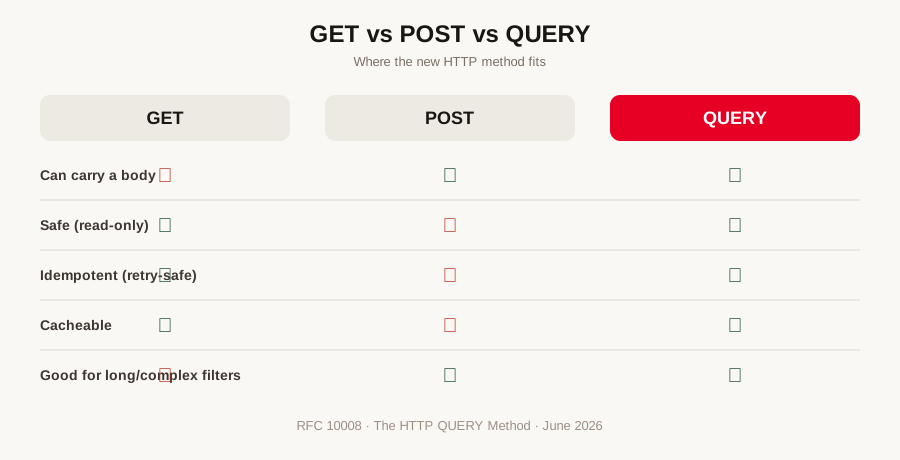
Reading through RFC 10008, the core idea clicked for me almost immediately: QUERY is GET's promise, with POST's body.
| GET | POST | QUERY | |
|---|---|---|---|
| Can carry a request body | ❌ (not reliable) | ✅ | ✅ |
| Safe (doesn't change server data) | ✅ | ❌ | ✅ |
| Idempotent (safe to retry) | ✅ | ❌ | ✅ |
| Cacheable | ✅ | ❌ | ✅ |
| Good for long/complex filters | ❌ | ✅ | ✅ |
| Keeps data out of URLs/logs | ❌ | ✅ | ✅ |
A QUERY request looks like this:
QUERY /products HTTP/1.1
Host: api.example.com
Content-Type: application/json
Accept: application/json

{
  "category": "shoes",
  "color": "red",
  "size": 9,
  "maxPrice": 50,
  "inStock": true,
  "sort": "newest"
}
What stood out to me here: the target resource (/products) is identified in the URL, exactly like GET — but the filtering instructions live in the body, exactly like POST. Per the spec, the server processes that body, but the protocol itself now guarantees the operation is read-only and safe to repeat. That guarantee is the whole point — it's declared at the protocol level instead of just being something I promised in my API docs and hoped people read.
How It Works: The Full Request Flow
Once I actually traced a request through the spec end to end, the flow was simpler than I expected:
- Client builds the request. Instead of stuffing filters into a URL, the app puts them into a JSON (or SQL, or GraphQL) body and sets the method to
QUERY. - Client sets a
Content-Typeheader. This is mandatory under the RFC. Without it, the server has to reject the request outright. - Request reaches the server. The server reads the method (
QUERY), checks theContent-Type, and parses the body accordingly. - Server validates the body. Malformed content gets
422 Unprocessable Content. An unsupported content type gets415 Unsupported Media Type. - Server processes the query as read-only. It can search, filter, or aggregate data, but per the spec it should never create, update, or delete anything — that's what "safe" means here.
- Server responds with results, optionally including a
Content-Locationheader pointing to a URL where the same result set can later be fetched with a plain GET — effectively turning a one-off search into something bookmarkable and cacheable. - Intermediaries (proxies, CDNs) can cache the response, because the method declared up front that doing so is safe — something POST could never offer.
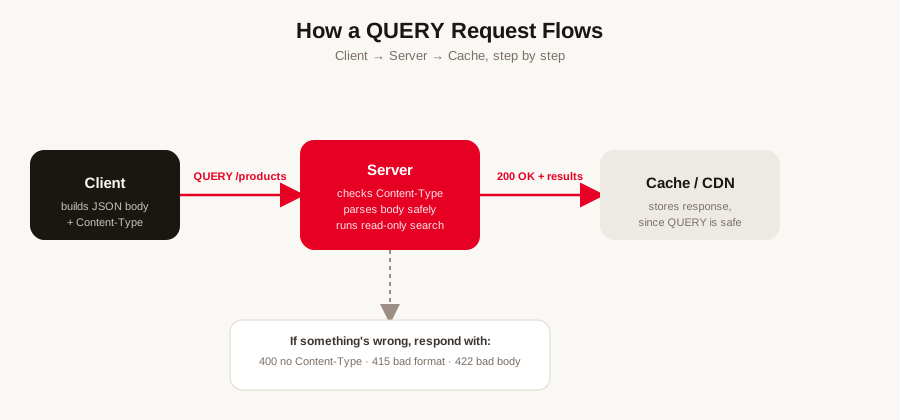
That loop is really the entire idea. Everything else in the RFC — error codes, caching rules, redirect behavior — exists purely to support that one cycle cleanly.
The Same Endpoint, Before and After
To actually feel the difference, I rewrote one of my own old search endpoints two ways.
Before — my usual POST hack:
// Old approach: search disguised as POST
app.post('/orders/search', (req, res) => {
  const { status, customer } = req.body;
  const results = orders.filter(o =>
    (!status || o.status === status) &&
    (!customer || o.customer === customer)
  );
  res.json(results);
});
Nothing here tells a cache or proxy that this is read-only. A retry after a flaky connection could, in theory, be treated like resubmitting a form.
Now — the same logic, but honest about what it is:
// New approach: QUERY, explicitly safe and cacheable
app.all('/orders', (req, res) => {
  if (req.method !== 'QUERY') return res.status(405).json({ error: 'Use QUERY' });

  const { status, customer } = req.body;
  const results = orders.filter(o =>
    (!status || o.status === status) &&
    (!customer || o.customer === customer)
  );
  res.set('Cache-Control', 'public, max-age=60');
  res.json(results);
});
Same filtering logic, same body shape — but now the method itself communicates exactly what kind of operation this is, to every cache and proxy in between, not just to whoever happens to read my API docs.
Testing It Myself in Node.js
I wanted to see if this needed any special tooling before I trusted it. It didn't. Node's built-in http module already accepts any method name, because HTTP methods have always technically been open text — nothing stops a server from reading QUERY off the request line just like it reads GET or POST.
const http = require('http');

const server = http.createServer((req, res) => {
  if (req.method !== 'QUERY') {
    res.writeHead(405, { Allow: 'QUERY' });
    return res.end('This endpoint only accepts QUERY requests');
  }

  let body = '';
  req.on('data', chunk => (body += chunk));

  req.on('end', () => {
    const contentType = req.headers['content-type'];

    if (!contentType) {
      res.writeHead(400, { 'Content-Type': 'application/json' });
      return res.end(JSON.stringify({ error: 'Content-Type header is required' }));
    }

    let filters;
    try {
      filters = JSON.parse(body);
    } catch {
      res.writeHead(422, { 'Content-Type': 'application/json' });
      return res.end(JSON.stringify({ error: 'Malformed query body' }));
    }

    const products = [
      { id: 1, category: 'shoes', color: 'red', inStock: true },
      { id: 2, category: 'shoes', color: 'blue', inStock: false },
      { id: 3, category: 'shirt', color: 'red', inStock: true },
    ];

    const results = products.filter(p =>
      (!filters.category || p.category === filters.category) &&
      (!filters.color || p.color === filters.color) &&
      (filters.inStock === undefined || p.inStock === filters.inStock)
    );

    res.writeHead(200, { 'Content-Type': 'application/json' });
    res.end(JSON.stringify({ count: results.length, results }));
  });
});

server.listen(3000, () => console.log('Listening on http://localhost:3000'));
Since browsers can't send QUERY through fetch() yet, I tested it with curl instead:
curl -X QUERY http://localhost:3000 \
  -H "Content-Type: application/json" \
  -d '{"category":"shoes","color":"red"}'
It worked exactly as I expected on the first try, which honestly surprised me a little — I half-expected Node to fight me on an unrecognized method name.
For Express, I registered it the same way I'd register any other route, checking req.method manually since Express has no .query() verb built in:
const express = require('express');
const app = express();
app.use(express.json());

app.all('/products', (req, res) => {
  if (req.method !== 'QUERY') {
    return res.status(405).set('Allow', 'QUERY').json({ error: 'Use QUERY' });
  }
  const { category, color } = req.body;
  // ...same filtering logic as above
  res.json({ category, color, message: 'Query received' });
});

app.listen(3000);
Testing It Myself in Python
Same experiment, different language. Python's built-in http.server handled it just as easily, no extra library required.
from http.server import BaseHTTPRequestHandler, HTTPServer
import json

PRODUCTS = [
    {"id": 1, "category": "shoes", "color": "red", "inStock": True},
    {"id": 2, "category": "shoes", "color": "blue", "inStock": False},
    {"id": 3, "category": "shirt", "color": "red", "inStock": True},
]

class Handler(BaseHTTPRequestHandler):
    def do_QUERY(self):
        content_type = self.headers.get("Content-Type")
        if not content_type:
            self.send_response(400)
            self.end_headers()
            self.wfile.write(json.dumps({"error": "Content-Type header is required"}).encode())
            return

        length = int(self.headers.get("Content-Length", 0))
        body = self.rfile.read(length)

        try:
            filters = json.loads(body)
        except json.JSONDecodeError:
            self.send_response(422)
            self.end_headers()
            self.wfile.write(json.dumps({"error": "Malformed query body"}).encode())
            return

        results = [
            p for p in PRODUCTS
            if (not filters.get("category") or p["category"] == filters["category"])
            and (not filters.get("color") or p["color"] == filters["color"])
        ]

        self.send_response(200)
        self.send_header("Content-Type", "application/json")
        self.end_headers()
        self.wfile.write(json.dumps({"count": len(results), "results": results}).encode())

HTTPServer(("localhost", 8000), Handler).serve_forever()
Same curl test, different port:
curl -X QUERY http://localhost:8000 \
  -H "Content-Type: application/json" \
  -d '{"category":"shoes","color":"red"}'
For Flask, all I had to do was list QUERY in the route's allowed methods, right alongside the usual ones:
from flask import Flask, request, jsonify

app = Flask(__name__)

@app.route("/products", methods=["QUERY"])
def query_products():
    filters = request.get_json(silent=True)
    if filters is None:
        return jsonify({"error": "Valid JSON body required"}), 422

    results = [p for p in PRODUCTS if filters.get("category", p["category"]) == p["category"]]
    return jsonify({"count": len(results), "results": results})

if __name__ == "__main__":
    app.run(port=5000)
Genuinely, that was the whole implementation on both sides. No dependency upgrade, no new package — just a method name and a body I was probably already sending anyway.
Where I'd Actually Use This
After sitting with it for a while, here's the line I've drawn for myself:
- I'm keeping GET for anything short enough to be bookmarkable or shareable as a URL — product pages, blog filters, pagination links.
- I'm keeping POST for anything that actually changes server state — creating an order, submitting a form, uploading a file.
- I'm reaching for QUERY when the search is read-only but too complex, too long, or too sensitive to sit safely in a URL — dashboards with dozens of filters, analytics queries, GraphQL-style search endpoints, or internal reporting tools.
If I've ever written that // yes this is technically a GET comment above an endpoint, that's exactly the kind of endpoint I'm migrating to QUERY first.
When NOT to Use Query Parameters
The flip side of "when to reach for QUERY" is knowing when your usual ?key=value query parameters are the wrong tool in the first place. I used to reach for them out of habit, not because they actually fit. A few situations where I've learned to stop and reconsider:
- The data is sensitive. Anything in a URL — API keys, customer IDs, tokens, pricing — can end up in server access logs, browser history, and
Refererheaders sent to third parties. A request body at least keeps it out of those places by default. - The filter set is long or deeply nested. Query strings were never designed for arrays of objects or multi-level filters. You end up either inventing a bracket-encoding convention (
filter[price][min]=10) or hitting a hard URL length limit, and neither one is fun to maintain. - You need the request to be retried safely. If a flaky connection means a client (or a proxy) might resend the exact same request, you want a method the spec itself guarantees is safe to repeat. Query strings on a GET are fine here — but the moment you're tempted to swap in a POST just to fit a bigger payload, you've lost that guarantee.
- You actually intend to change something. This sounds obvious, but I've seen — and written — GET endpoints with a
?action=deleteparameter. A query parameter should never be the thing that triggers a write, an update, or a delete. If it changes data, it belongs in the body of a POST, PUT, PATCH, or DELETE, never in the URL. - You want one canonical resource, not thousands of near-duplicate URLs. Every distinct combination of query parameters is technically a distinct URL to a cache, a crawler, or a CDN. For a handful of filters that's harmless; for a faceted search page with a dozen optional filters, it can quietly generate duplicate-content issues and cache fragmentation.
- You're building for machine-to-machine calls with a structured payload. GraphQL bodies, SQL-like filter expressions, or anything with real internal structure reads far more cleanly as a JSON or GraphQL body than as an escaped, flattened query string.
None of this means query parameters are outdated — for short, shareable, cacheable, read-only lookups, they're still exactly right. It just means "can I fit this in a URL" and "should I fit this in a URL" are two different questions, and I try to actually ask the second one now.
Watch: The REST Concepts Behind QUERY, Explained by Fireship
QUERY is new enough that I couldn't find a major creator who's covered it directly yet. But the entire reason it exists comes down to the GET/POST split explained here by Fireship — one of the most-watched coding channels on YouTube:
And for a walkthrough of the QUERY method itself:

My Honest Verdict: Should You Use It Today?
Short answer: for my own public-facing, browser-called endpoints — not yet. For everything else — yes, already.
- Browsers can't send a QUERY request through
fetch()orXMLHttpRequestyet, so anything called directly from client-side JavaScript in a browser is off the table for now. - CDNs and proxies mostly don't recognize QUERY as a distinct method yet. Some will pass it through without caching it, treating it like an unrecognized method.
- Server frameworks are ahead of the curve — as I found above, Node and Python handle it with zero extra effort, and newer platform releases like .NET 10 now ship with first-class QUERY support out of the box.
Where I've landed: I'm using QUERY freely for server-to-server calls and internal tools, anywhere I control both ends of the request. For public APIs meant to be hit directly from a browser, I'm giving fetch() and CDN support more time to catch up before I migrate those endpoints over.
Quick Cheat Sheet
| Situation | What to use |
|---|---|
| Simple filters, shareable URL | GET |
| Creating/updating/deleting data | POST / PUT / PATCH / DELETE |
| Complex read-only search, server-to-server | QUERY |
| Public browser-facing search, right now | GET (for now) or POST as a temporary fallback |
| Sensitive data (IDs, tokens, pricing) | Never in a URL — use a request body |
| Missing Content-Type on a QUERY request | Server must return 400 |
| Query body has bad syntax | Server should return 422 |
| Unsupported query format | Server should return 415 |
Frequently Asked Questions
What is the HTTP QUERY method in simple words?
QUERY is a new HTTP method, standardized in June 2026 as RFC 10008, that lets you send search or filter data inside the request body — like POST — while still being safe, idempotent, and cacheable, like GET.
Why do we need QUERY when GET and POST already exist?
GET can't reliably carry a body and breaks on complex filters. POST can carry a body but isn't safe or cacheable. QUERY fills that exact gap.
Is HTTP QUERY the same as a URL query string?
No. A URL query string is the part after the "?" in a GET request. QUERY is an entirely different thing — an HTTP method that sends data in the request body, not the URL.
Can I use HTTP QUERY in production today?
Yes for server-to-server calls and internal tools. Not yet for public browser apps, since fetch() and most CDNs don't fully support it.
Does QUERY replace GET completely?
No. Keep using GET for short, shareable, bookmarkable searches. QUERY is for the cases where GET breaks down.
What Content-Type should I use with QUERY?
Whatever your query language needs — usually application/json. The header itself is mandatory; a missing one should get a 400 response.
Which companies are behind the QUERY method?
RFC 10008 was authored by Julian Reschke (greenbytes), James M. Snell (Cloudflare), and Mike Bishop (Akamai).
Do I need any special library to use QUERY in Node.js or Python?
No. Both languages' built-in HTTP tooling already accepts any method name, QUERY included, as I found out while testing it myself.
When should I avoid using query parameters in a URL?
Avoid them when the data is sensitive, the filter set is long or deeply nested, the request needs guaranteed-safe retries, or the request actually changes data — query strings were never built to handle any of those safely.
Authoritative References
Everything I've described about the spec itself traces back to these primary sources — worth bookmarking if you want to go deeper than a blog post:
- RFC 10008 — The HTTP QUERY Method (RFC Editor) — the final, published standard.
- RFC 10008 on the IETF Datatracker — status, errata, and formal metadata for the RFC.
- draft-ietf-httpbis-safe-method-w-body — the full history of the draft, including the earlier "SEARCH" naming and every revision before it became RFC 10008.
- HTTP Working Group (HTTPbis) — the IETF working group that developed the spec, for tracking related HTTP extensions.
- MDN: HTTP request methods — how QUERY fits alongside GET, POST, and the rest of the method registry.
- MDN: URI query component — a refresher on what a URL query string actually is, for anyone still mixing it up with the QUERY method.
A Personal Note
I'll be honest about why this post exists: it's less about QUERY itself and more about finally having language for something I'd been doing wrong, quietly, for years. Every "yes this is technically a GET" comment I ever wrote was me admitting the tools didn't quite fit the job, and just working around it anyway because that's what shipping software means most days.
What I liked about actually sitting down with the spec instead of skimming a summary of it was realizing how unglamorous the fix was. No new framework, no new mental model, no migration guide to dread — just a method name I could drop into code I already had, in an afternoon, in two different languages. That's rare enough in this field that it felt worth writing down.
I don't think QUERY changes how any of us build software overnight. Browser support isn't there, CDN support isn't there, and most teams have bigger priorities this quarter than renaming an HTTP verb. But I like knowing it exists, and I like that the next time I catch myself writing POST /search, I now have a better answer than "it's fine, everyone does it this way."
Keep Reading
- 22 Years Old, -₹400 in My Bank Account... — the developer-life story behind why I care this much about shipping things right, not just fast
- The Developer Setup Trap: Why Better Gear Won't Make You a Better Coder — same instinct to chase the "proper" way of doing things, a different context
- My First Project Failed Quietly. Here's What It Taught Me. — on the quieter kind of engineering mistakes that don't show up as a crash
If this helped the QUERY method finally make sense, share it with a fellow developer still fighting the GET-vs-POST debate in a pull request somewhere.
Did you find this helpful?
FAQ